Link
Share it in messaging apps, on social media, in your map and business listings or in your e-mail signature.

Online booking
A booking page of your own. Share the link, add it to your website or put the QR code on the counter; the time they pick lands in your calendar.
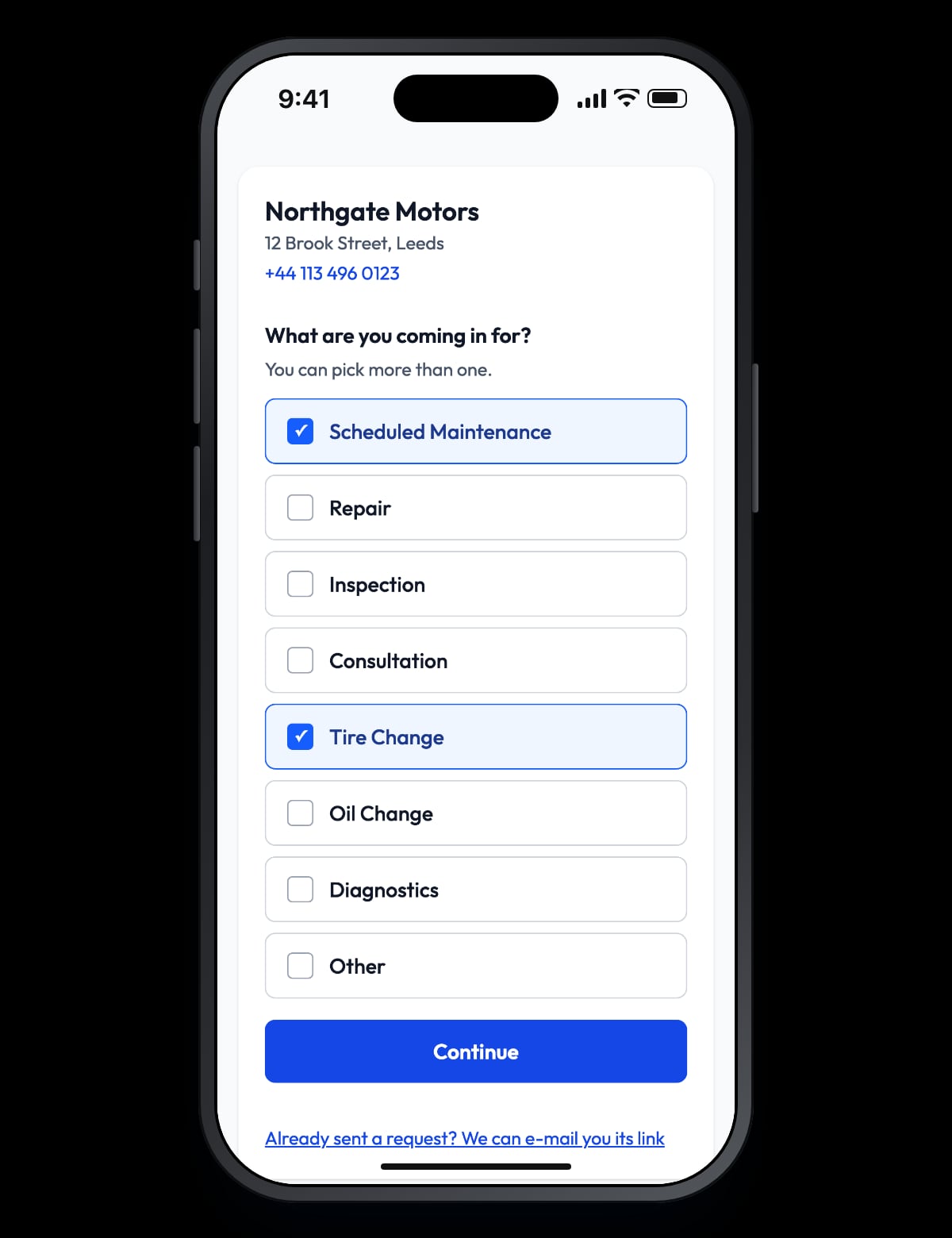
No account and no app for the customer. It takes a minute on a phone or a computer.
Maintenance, tyres, diagnostics… Several can be picked together; only the services you offer appear.
Only times that are really free are listed. Swipe between days on a phone, use the arrows on a computer.
Name, phone, e-mail, plate, make and model. A note if they have one.
You are notified; the customer gets a confirmation e-mail with call and directions buttons.
The page keeps no calendar of its own; it reads yours in Autovena. An appointment you make in the workshop fills that time on the page, and a booking from the page shows in your calendar.
By default a customer who picks a free time is booked at once, linked to the customer and vehicle you already know or added as new. If it does not suit you, cancel it or move it; the customer is e-mailed. To see every request yourself first, switch to approval in Settings: requests wait in the inbox and the time is held meanwhile.
When the match is not certain — say the plate belongs to another customer — the booking is not made automatically; it waits for you. The decision always stays with you.
Share it in messaging apps, on social media, in your map and business listings or in your e-mail signature.
Paste one snippet into your site; the form opens inside your page, takes your site's background and sizes itself to its content.
Put it on the counter, a business card or the bottom of an invoice; a phone camera opens the booking page.
Add a "Book online" button to your site; the page opens in a new tab.
A public page has to be protected from fake requests filling your calendar. You set the limits.
With the link in the confirmation e-mail the customer sees the booking and can cancel it up to the cut-off you set. When you move or cancel it, the customer is e-mailed. The page appears in the languages you offer in Settings.
Notifications go out by e-mail; no text messages are sent. Customers cannot move a booking themselves — they cancel and book another time, or call you.
No. They enter their name, phone, e-mail and vehicle, and see their booking through the link in their e-mail.
From your working hours, parallel capacity, blocked times and existing appointments in Autovena. There is no second calendar to keep.
Yes. The page has its own address; sharing the link and using the QR code is enough.
Cancel it or move it in the calendar. The customer is e-mailed; ideally you call them too.
Bot protection, a daily limit and a per-person limit on upcoming bookings prevent it. A booking you mark as spam is cancelled, the time is freed and the sender is blocked for 30 days.
Open an account in a minute, add your first vehicle, and see how it fits your shop. No card, no call, no commitment.
Mobile app
Scan registrations, VINs and barcodes with the camera, and securely access your shop from anywhere.
Scan with your phone camera or open the App Store.

 Scan with camera