Your workshop, wherever work happens.
Manage work orders, customers, vehicles, inventory and payments across web, tablet, Android and iPhone — all in one cloud-based platform.
- No credit card required
- Unlimited users
- Cancel anytime


 iPhoneiPad
 AndroidAndroid Tablet
 macOS
macOS Windows
 Linux
Linux ChromeOS
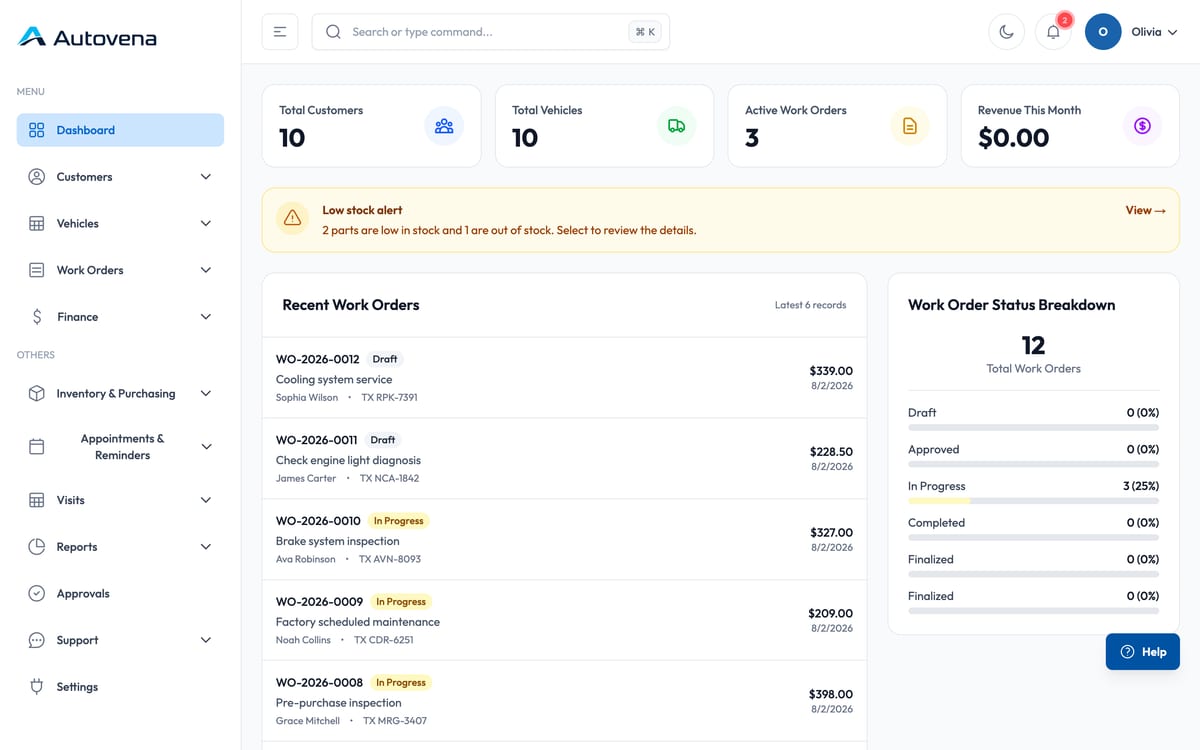
The dashboard
The whole shop on one screen
Jobs in progress, today's revenue, low stock and overdue balances — the moment you sign in.
✦ Autovena AI Assistant
Skip the manual.
Ask and learn instantly.
Autovena AI Assistant is available whenever you need help on web or mobile. It helps you find the right screen, learn each task step by step and continue where you stopped.
Ask naturally
Describe the task without knowing menu or screen names.
Go to the right screen
Let the assistant use your current context to guide you.
Continue step by step
Keep getting the next instruction until the task is complete.
How do I add a new customer?
Open Customers and select the New customer button.
I’m on the screen. What should I do next?
How a job moves
From the first call to the last payment
-
Appointment
Book the vehicle in, or take a walk-in.
-
Check-in
Customer, plate, mileage, complaint. History already there.
-
Work order
Assign a technician, add labour and parts.
-
Parts
Pull from stock by barcode; the shelf allocation updates itself.
-
Invoice
Turn the finished job into an invoice with tax and discounts.
-
Payment
Record full or partial payment; the balance follows.
Work orders
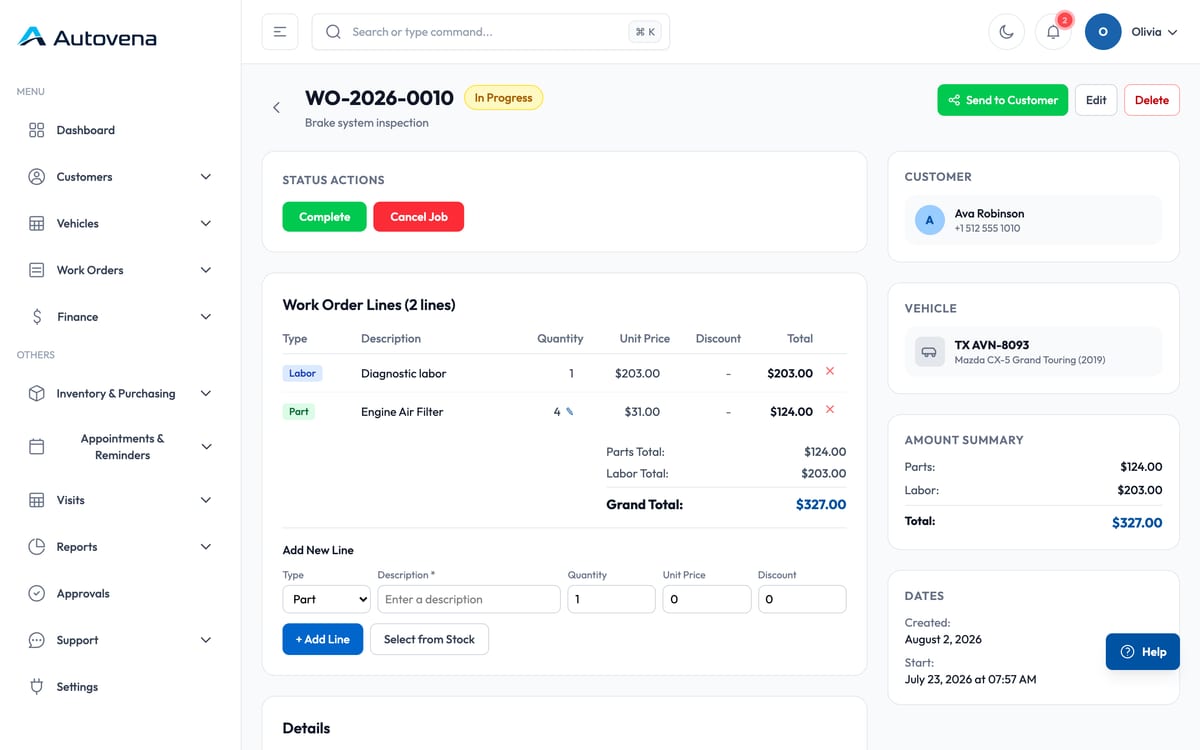
Work orders your technicians actually use
Every job carries the vehicle, the complaint, the assigned technician, labour lines, parts pulled from stock and a running total. Status moves from draft to invoiced, and nothing is lost between the bay and the front desk.
- Parts come off stock the moment they are added — and go back if the job is cancelled
- Labour and parts totals update live, so the estimate matches the invoice
- Share the job for approval straight to the customer's WhatsApp
- Print or save the job sheet as PDF
Customers and vehicles
Every vehicle remembers its own history
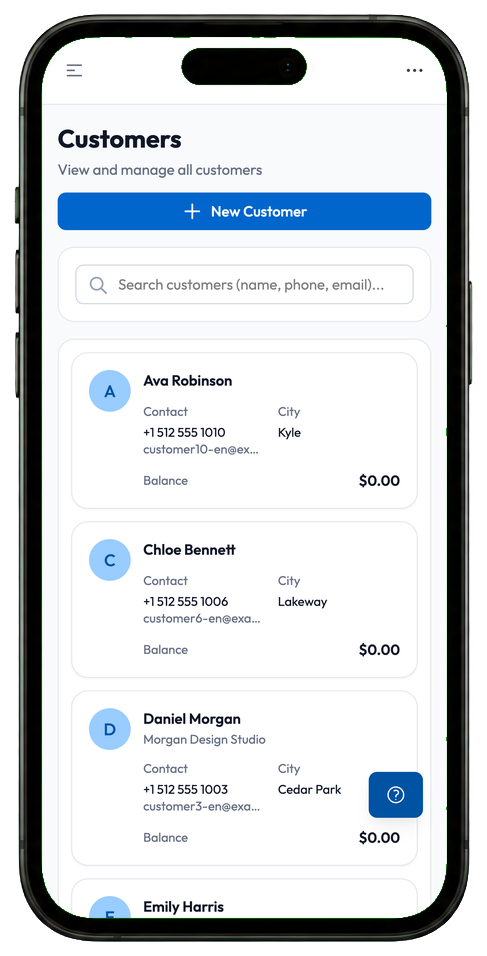
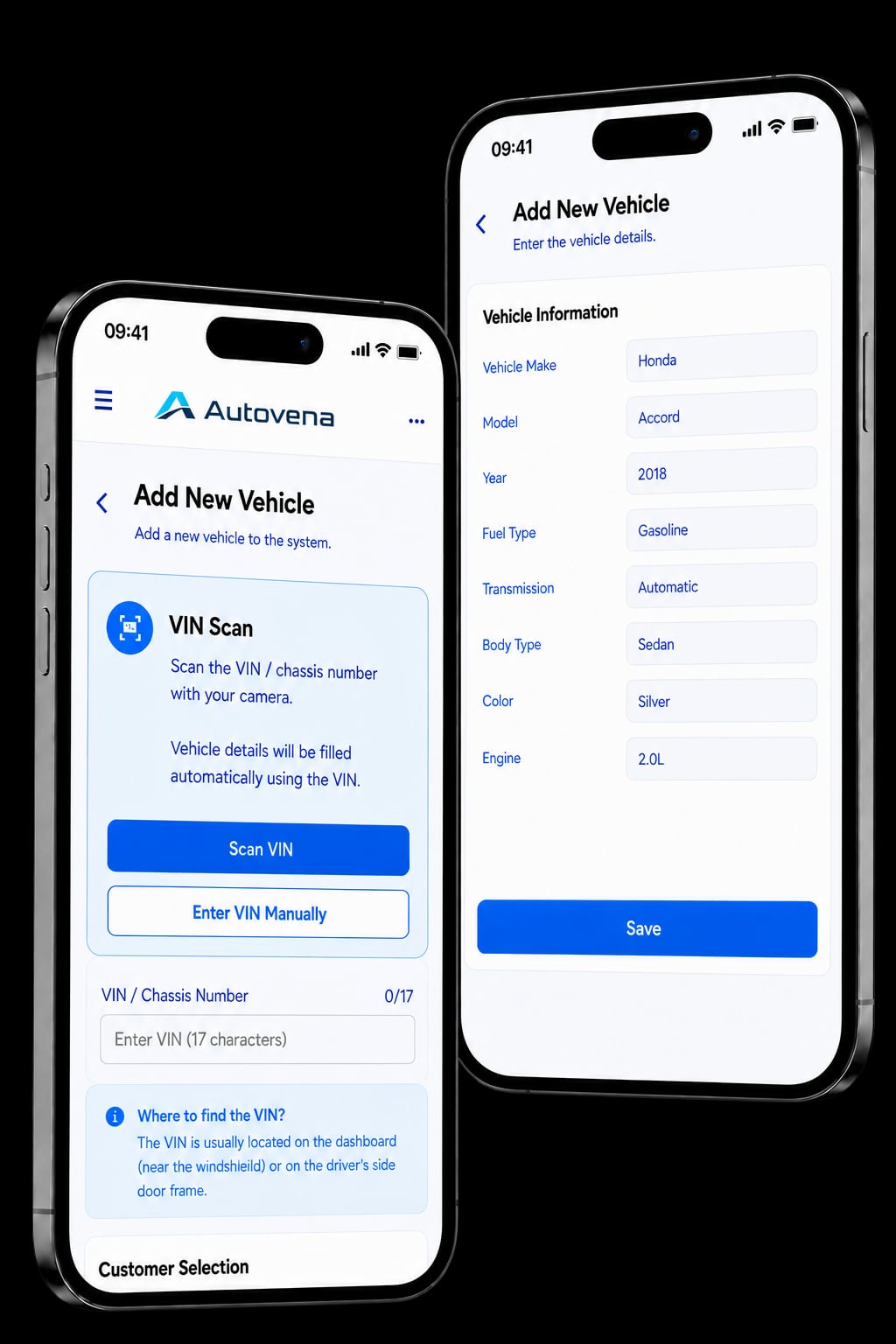
Open a plate and see every visit, every job, every part fitted and every invoice. Add a vehicle in seconds by scanning its VIN with the phone camera — make, model, year and engine fill themselves in.
- Customer card with contact details, vehicles, balance and notes
- Full service history per vehicle
- Scan the VIN and the vehicle details fill themselves in
- Service reminders for the work that comes back around
Inventory and warehouse
Know where every part actually is
Most shop software tells you how many you have. Autovena tells you which shelf it is on.
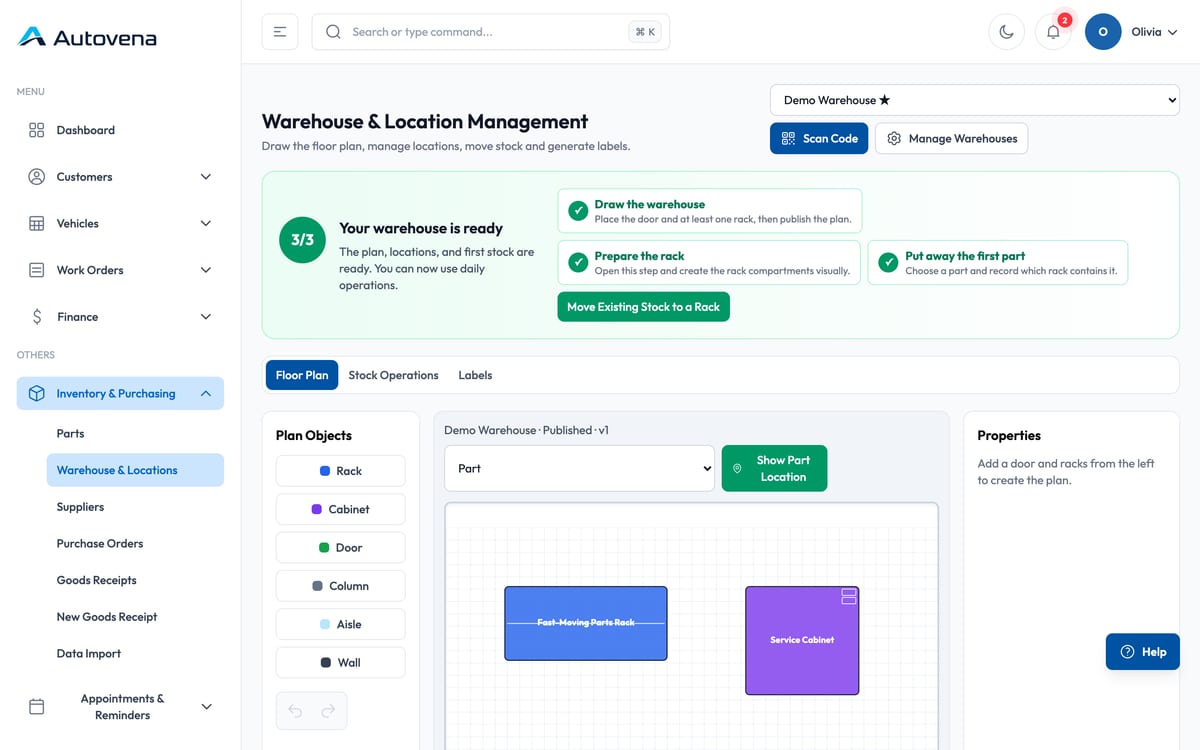
Draw it once
Doors, aisles, racks, cabinets, walls and columns — dragged into place, then published. Split each rack into bins and drawers.
Find it later
Pick a part and the system draws the route from the door to the exact bin, and describes the same route in words.
Label it
Part and shelf labels on A4 sheets — including part-used sheets — or straight to a Zebra thermal printer.
Mobile
The shop floor, in your hand
The mobile app opens the same account with a secure sign-in — Face ID or fingerprint if you want it — and adds what a phone is good at.
- Scan a VIN with the camera instead of typing seventeen characters
- Scan part and shelf barcodes for stock moves and job lines
- Everything you can do at the desk, you can do from the phone
Autovena runs in the browser on any phone or tablet, so you don't have to install anything. If you want camera scanning and fingerprint sign-in, the iPhone and Android apps add that.
Invoicing and payments
Get paid, and know who still owes you
Turn a finished job into an invoice, record full or partial payments, and watch every customer balance in one place.
Receivables and payables
Both sides of the ledger with ageing, so you chase the right customer first instead of the loudest one.
Credit limits and risk
Set a limit and payment terms per trade customer. Sales over the limit need an approval, and the decision is recorded.
Payment promises
Log what the customer promised, when, and who is following it up. The reminder lands with that person.
Statements and reconciliation
Statements as PDF or Excel, plus a secure link that lets a customer confirm their balance or flag a difference.
Reporting
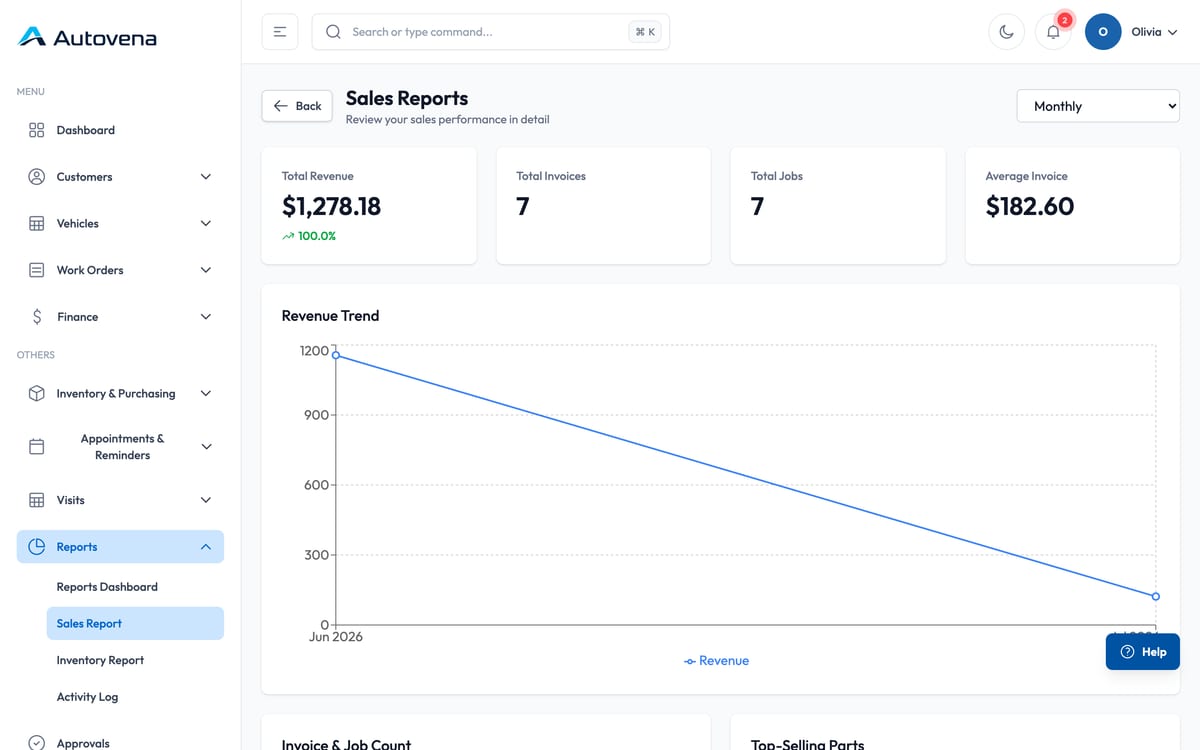
Numbers you can act on
Sales, inventory and customer balances over any period, with export when you need the figures outside the system.
- Revenue, invoice count and average invoice over the period you choose
- Inventory value, low stock and slow movers
- Receivables ageing
- Excel export from the reports and statements
Cloud and continuity
Your shop does not live on one computer
Autovena runs on central cloud infrastructure. Your data is stored on the server, not on a machine in the back office — so a broken laptop, a lost phone or a malware infection does not take your business records with it.
| — | Traditional single-computer shop software | Autovena |
|---|---|---|
| Access | One installed PC | Web, tablet, Android and iPhone |
| Off-site access | Usually none | Anywhere, within your permissions |
| Hardware failure | Data lives on that machine | Data lives in the central cloud |
| Backups | Your responsibility | A copy of your records taken automatically, every day |
| Team visibility | Often a single user | Everyone on the same up-to-date data |
| Mobile | Usually none | Included in the same plan |
| Pricing | Per seat, per module | One price, unlimited users |
This compares the architecture of locally installed, single-computer shop software in general. It is not about any particular product.
Everything above is how Autovena works today — not a roadmap.
Pricing
One plan. Unlimited users. No surprises.
Autovena Core
Everything Autovena does, in one package that does not charge per seat.
$24.99 /month
$249.90 /year · 2 months free · Save 16.7%
Also works as a mobile app — iPhone, Android, iPad and Android tablets included.
- Tax is not included — your local rate is added at checkout
- There is no setup fee and no minimum term
- There is no per-user, per-device or per-module charge
Standout features included
24/7 AI product assistant
Ask in English or Turkish. It answers questions, finds the right screen and guides you step by step.
Barcode and QR scanning
Scan part and shelf labels with your phone for faster stock moves and work-order entry.
VIN scanning and decoding
Scan the chassis number and let available make, model, year and engine details fill the vehicle form.
Visual warehouse routes
Model racks, bins and drawers, then show the route from the warehouse door to the exact part.
Also included
- Unlimited users
- Unlimited devices
- Unlimited customers and vehicles
- Unlimited work orders and parts
- Web and mobile access
- iOS and Android apps
- Inventory, purchasing and warehouse
- Invoicing, payments and customer balances
- Reports and exports
- Data import from CSV and XLSX
- Help centre and support
No credit card. Your data is kept if you decide not to continue.
Why one plan? Charging per user punishes you for putting a tablet in the bay. We would rather you used it everywhere.
Payments are handled by Paddle. Paddle acts as the Merchant of Record for your subscription and takes care of billing and taxes.
Access and security
Everyone sees what they should
Roles
Owner, service advisor, technician, accounting — each person gets the screens their job needs, and not the ones it does not.
Sessions
Sign-in expires after inactivity and again after a fixed period, and you can end a session from anywhere.
Audit trail
Sensitive actions such as payments, credit decisions and exports are recorded with who did them and when.
Frequently asked questions
Do I need to install anything?
No. Autovena runs in your browser. The mobile app adds camera scanning and biometric sign-in, but everything is available from a browser on any device.
Do you need my card for the trial?
No. The 14-day trial starts without any payment details.
What happens when the trial ends?
Your data is kept. Access becomes restricted until you subscribe, and then you carry on where you left off.
Can I move my existing data in?
Yes. Suppliers, parts, opening stock, purchase orders and goods receipts import from CSV or XLSX templates, with a preview and validation step before anything is written.
How many users can I add?
As many as you need. The price does not change, and devices are unlimited too.
Which languages and currencies do you support?
The interface is available in English and Turkish. You set your country, currency and time zone once, and amounts, dates and reports follow it.
Is my data backed up?
A full copy of your records is taken automatically every day, and copies going back months are kept.
Can I export my data?
Yes. Reports and statements export to Excel, and documents print to PDF.
How do I get help?
Every screen has a step-by-step guide inside the app, and you can open a support request from your account.
Start with your next job.
Open an account in a minute, add your first vehicle, and see how it fits your shop. No card, no call, no commitment.