Work orders
Work orders your technicians actually use
A job is the centre of everything else. It holds the vehicle, the complaint, the technician, the labour, the parts and the total — and it turns into an invoice without anything being typed twice.
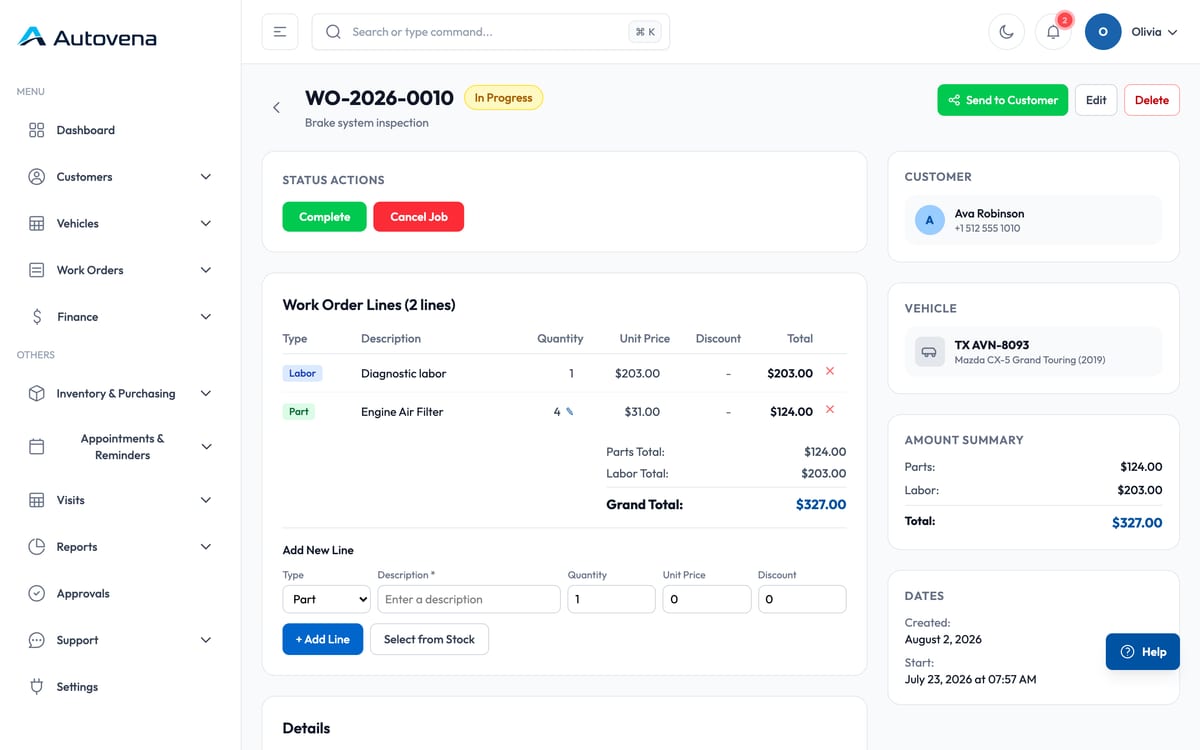
Lines that mean something
Labour and parts sit on the same job as separate line types, each with quantity, unit price and discount. The parts total, labour total and grand total recalculate as you go, so the number you quote is the number you invoice.
- Add a part from stock and the stock level drops immediately
- Cancel the job and the part returns to the shelf allocation it left
- Discounts per line, not just per invoice
- Job sheet as PDF for the customer or the file
Status, not guesswork
A job moves from draft through approved and in progress to completed and invoiced. The dashboard counts them, so you can see what is actually open without walking the floor.
Getting approval
Send the job summary — line items, subtotal, tax and total — straight to the customer's WhatsApp from the job screen. It opens in your own WhatsApp, so there is nothing to configure and nothing per message to pay.
Frequently asked questions
Can two people work on the same job?
Yes. The job lives on the server, so the advisor at the counter and the technician on a tablet are editing the same record.
Can I invoice several jobs together?
Yes. Completed jobs queue up for invoicing and can be billed individually or grouped for the same customer.
Start with your next job.
Open an account in a minute, add your first vehicle, and see how it fits your shop. No card, no call, no commitment.